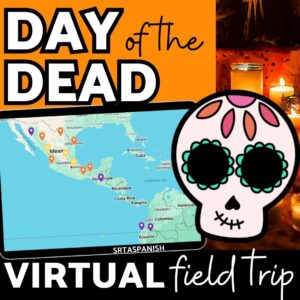
I love Google My Maps to create interactive activities for students to explore with! A common question I run into when teachers want to start incorporating these virtual field trips is “How long do they take students to complete?”
Let’s Consider..
The length of time for the activity depends on a few factors:
How old are your students?
How familiar are they with technology? Have they ever done an interactive Google My Map before?
Which language is the resource in? How will the language used affect their time to complete the resource?
In my experience, younger students will take a little longer to navigate the map. If your students are not in a 1:1 situation, or are brand new to these virtual field trips, it will also take them a little longer for their first one!
The language of the map, readings, and videos will also affect how long your students take! If they’re novice students interacting with a Spanish field trip, it will take them longer to read and comprehend the map. You know your students’ levels better than anyone, so take some time to glance at the markers on the map for yourself and see how your students will do!
Ways to Set the Pace for Your Google My Maps Activities
When it comes to using Google My Maps activities in class, the real magic is in how flexible they are. Some days your students breeze through a field trip with time to spare, and other days you’re wishing for ten extra minutes just to wrap it up. The key is planning for that range without stressing over it.
I like to think of these Google My Maps activities as guided exploration. Your students are in control of the pace, but you’re still giving them the structure to succeed. If it’s their first time, I always plan a bit of buffer time. Maybe we walk through one marker together first. I show them how to zoom, how to toggle between map and satellite view, and how to spot where the videos or text are. After that, they usually catch on pretty fast.
So, how long?
In general, when I use map activities like this one in my classes, I do my usual start of class routine (roughly 8 minutes), then the map activity. I usually include a “sponge” or fast finisher activity just in case for my speediest students, but that is my lesson plan for a 45-50 minute class period with my high school Spanish 1s. When I taught middle school I found that the fast finisher was rarely needed!
Need a Fast Finisher Idea?
If you need something simple for fast finisher for your students, consider any of these options:
For my high school Spanish 1 students, I usually count on about 30 to 35 minutes to complete a full map activity. That gives us time to do a quick check-in at the beginning of class, let them explore, and circle back for a short wrap-up. If the map includes more video content or longer readings in Spanish, I plan for the full class period and keep a quick reflection or vocab task as a next-day follow-up.
Middle schoolers tend to take a bit longer, especially the first time around. The good news? They love it. Once they get into it, they’re totally immersed. And if someone finishes early, I’ve got my fast-finisher activities on standby, and you better believe they ask for more maps later.
Watch the Video with a Demo Lesson!
In this YouTube video, I share how I fit one of the virtual field trips into my lesson plan! Hopefully this helps give you a quick overview for how you could fit any of the virtual field trips into your plans.
Ashley Mikkelsen
Hi, I'm Ashley. I'm so glad you're here! I love helping secondary Spanish teachers with engaging activities and ideas for their lesson plans. I can't wait to support you with no and low prep activities to help reduce your workload!