If you’ve been hearing about Boom Cards and aren’t sure if they’re a good fit for you, one of the questions I hear most often is, “Do you have to pay to use Boom Cards?” or “How much does it cost to use Boom Cards?”. The short answer is no, you don’t have to, but the longer answer is that you can and might want to – but let’s look at that a bit more in this post!

Curious about Boom Cards? Check out my other posts on them here!
- What are Boom Cards?
- 10 Reasons to try Boom Cards in Language Class
- What can you do with Boom Cards?
- Google Classroom + Boom Cards
- How to Customize a Boom Card deck
- Using Boom Cards for Guiding Your Instruction
- Comparing Boom Cards to other sites
- How to Print Boom Cards
- How to Create Boom Cards (Time Lapse)
Do you have to pay to use Boom Cards?
The answer? No. You can set up your free teacher account and assign them to your students using a fast pin. Here are the step by step instructions:
1. Sign up or sign into your Boom Account
2. Add a deck to your library (if you don’t have any yet) or just..
3. Go to your library to find the deck you want to use.
4. Click Action
5. Choose Fast Play
6. Share the link with your students on whatever platform you use!
Watch the :22 second step by step video:
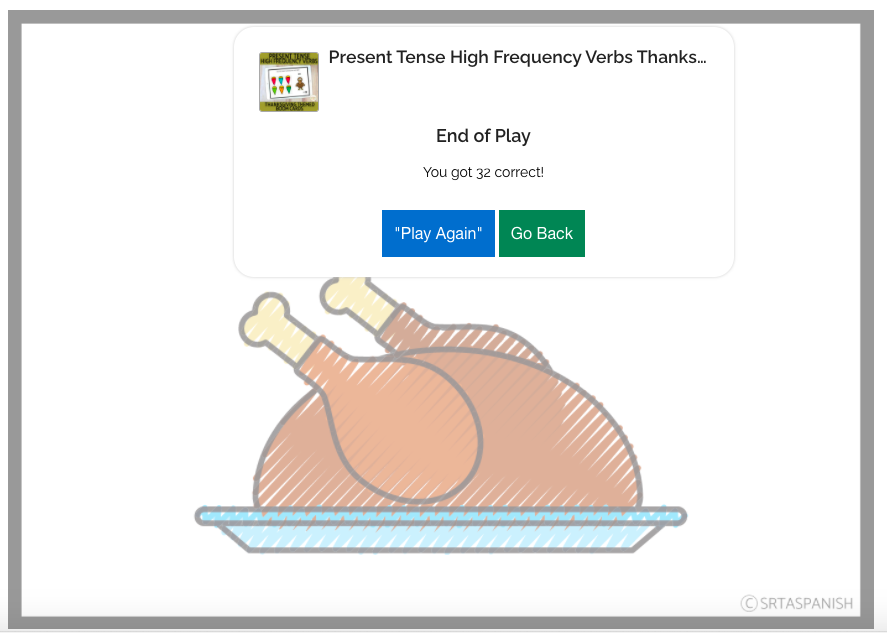
Right now, a fast pin link works for 2 weeks with the generated code. At the end of a fast pin play, there’s a little screen like the one below to tell them how they did. This is what some of my friends have their students submit to them. You can also just share the link as practice!
What Can You Do with a Free Boom Learning Account?
A free Boom Learning account is a great way to explore the platform without any pressure. It gives you the freedom to try out decks, experiment with student engagement, and see if it’s the right fit for your teaching style
With the free version, you can assign Boom Cards using a fast pin link. That means students don’t even need logins. You just grab the link and send it through Google Classroom, email, or whatever platform you use
This is especially helpful if you’re short on time or just want to try it out without setting up an entire class. Students can complete the deck and get immediate feedback at the end. You don’t see the scores or responses unless you upgrade, but it’s still a great low-stress practice tool.
What Happens When You Upgrade?
The magic of Boom Cards really kicks in when you go beyond the basics. With a paid account, you get full access to student progress, which means no more guessing who understood what. You can see every answer and track growth over time
Another perk? You can organize your classroom digitally with student logins. If you’re using Google Classroom, importing is a breeze and suddenly you have data at your fingertips. That data is gold when it comes to grading and targeted review
You also unlock the ability to customize what cards students see in a deck. So if a set has 30 cards but you only want to assign 15, you can do that. No need to edit the deck itself. Just select what you want and go
If Boom Cards have already made your life easier during virtual learning, the upgrade is worth it. And if you’re just starting out, the free version is a no-pressure way to explore.
Watch the Video on How to Share a Fast Pin (less than :30 seconds!)
How much does it cost to use Boom Cards?
Boom Learning has several different plans to choose from, based on what you want to do with your account and how many students you will work with. Go here to check out more pricing info!
Why might you want a paid account?
In my opinion, the paid account is a very affordable yearly price! Of course, it always comes down to what you use most and what you’ll get a lot of use out of, but I personally found Boom to be a huge lifesaver when we switched to distance learning. A paid account allows you to..
- Get detailed reports about student progress and activity
- Import a classroom of student logins
- Customize Decks that you did not create (not editing, but choosing which cards the students see!)
Which do I recommend?
Personally, I like the paid account because it allowed me to import my students through Google Classroom, then it gave me a really nice spreadsheet to just shoot straight down as I was entering grades. Anything to make grading online easier!!
I also assigned at least one set of Boom Cards a week throughout distance learning this spring. They’re just a really flexible tool for language! Check out my blog post here to see what you can do with Boom Cards.
I hope that gave you an answer to the question, “Do you have to pay to use Boom Cards?”!
If you have any questions about them, or anything I’ve shared, feel free to comment below. If you are curious about Boom Cards and want to try some of the sets I’ve made, check them out here!


-
Sale!

Spanish Cognates Lesson Plans 1st Day of Spanish Class & First Week of School
Original price was: $22.11.$14.49Current price is: $14.49. Add to cart -
Sale!
Back to School BUNDLE
Original price was: $19.30.$15.65Current price is: $15.65. Add to cart -
Sale!
Back to School Spanish Starter Pack
Original price was: $8.45.$5.59Current price is: $5.59. Add to cart -
Sale!
RAINBOW Classroom Decor BUNDLE
Original price was: $18.41.$12.45Current price is: $12.45. Add to cart